The window
A Mac app, not a browser tab you have to remember.
It carries the command-line tool inside it, so the app is the only thing you need to install.
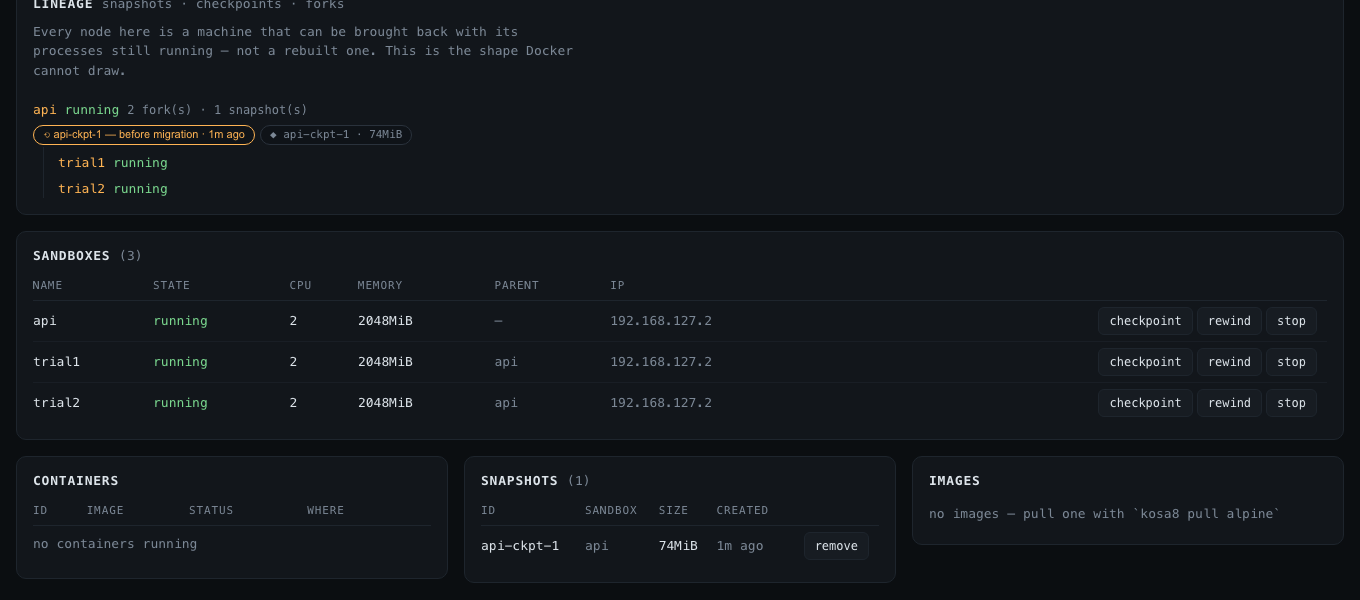
Dashboard
Machines, containers, images, save points — and the tree of what was copied from what. It runs on your own machine, binds to loopback only, and needs no account to look at your own computer.
kosa8 desk on 127.0.0.1:7444
  http://127.0.0.1:7444/?t=3f9c…
  the token in that URL is this run only — stop with ctrl-c

# it shows the one thing no other container UI can draw:
sealed
├─ sealed-ckpt-1  before the risky bit
├─ sealed-explore-712651   ok      echo one
├─ sealed-explore-712652   error   false
└─ sealed-explore-712653   ok      echo three  ← winner
The window
It carries the command-line tool inside it, so the app is the only thing you need to install.
What it is for
Every fork records its parent, so the dashboard can draw the tree. When eight assistants are running and one of them is the good one, this is how you find it.
Forking →SANDBOX STATE CPUS MEMORY PARENT sealed running 2 1024MiB - sealed-explore-712653 running 2 1024MiB sealed # the dashboard draws the same thing as a tree, live
Checkpoints carry the label you gave them, so a list of save points reads like a history of the session rather than a column of identifiers.
Checkpoints →CHECKPOINT WHEN TAKEN WHY *sealed-ckpt-1 just now you before the risky bit * is where `kosa8 rewind sealed` goes # clicking one in the dashboard rewinds to it
Every action through the daemon is recorded, including whether a human or a tool asked for it. The dashboard shows the tail; the audit log is the whole thing.
Audit and policy →SEQ TIME ACTOR ACTION TARGET STATUS 1025 00:26:10 human sandboxes.create 201 1028 00:26:11 human sandboxes.snapshot sealed 200 1030 00:26:11 human snapshots.restore sealed-ckp.. 200 1032 00:26:14 tool sandboxes.run sealed-exp.. 200 1035 00:26:14 tool sandboxes.delete sealed-exp.. 200 ↑ 'tool' means an assistant asked, not you
It is one command, and it is already installed.